

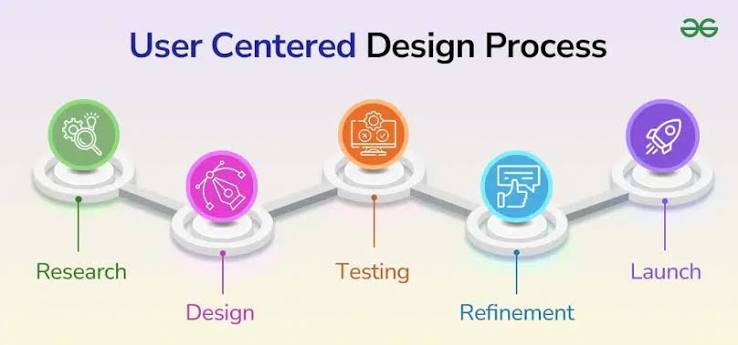
User-centered design is an important principle in the development of online gaming platforms. Instead of focusing exclusively on technical performance or visual appearance, this approach considers the needs, expectations, and behaviors of users throughout the design process. By examining how people interact with digital environments, developers can create interfaces that are accessible, efficient, and straightforward to navigate.
Online gaming platforms operate in a digital environment where users expect responsive interfaces, clear instructions, and reliable technical support. Complicated registration procedures, confusing navigation menus, and inconsistent performance can create unnecessary barriers. User-centered design addresses these challenges by simplifying interactions and making essential functions easier to understand.
Effective engagement involves more than encouraging users to spend additional time on a platform. It also depends on whether individuals can complete tasks efficiently, access relevant information, and maintain control over their digital interactions. These principles provide a practical foundation for evaluating the quality of online services.
Interface Design and Navigation Efficiency
Interface simplicity plays a significant role in determining how users experience digital platforms. Navigation menus, search functions, account settings, and support sections should follow consistent design patterns. Familiar arrangements reduce the effort required to locate information and help users understand how different features relate to one another.
Visual hierarchy is equally important. Typography, spacing, headings, and contrasting elements guide attention toward relevant information. When too many elements compete for visibility, users may struggle to identify important controls. A balanced interface establishes clear priorities without introducing unnecessary visual complexity.
Mobile compatibility requires additional consideration because smartphones have become a common device for accessing digital entertainment. Smaller screens create limitations involving readability, touch accuracy, and available space. Responsive design addresses these challenges by adapting layouts to different screen sizes while preserving essential functions.
Accessibility should also be considered during the initial development process. Readable text, descriptive interface labels, keyboard navigation, and sufficient color contrast help accommodate people with different abilities and technical experience. Consistent accessibility practices improve usability across a broader range of devices and circumstances.
Modern Operator Services and Communication
Operator services influence the user experience beyond the interface itself. Technical assistance, account guidance, security information, service announcements, and payment instructions are examples of functions that require careful organization. Users should be able to locate relevant information without navigating through multiple unrelated sections.
A well-structured support system distinguishes between general questions and issues requiring individual assistance. Frequently asked questions can address routine concerns, while dedicated support channels can handle account-specific problems. Clear explanations of response procedures also help establish realistic expectations.
Communication should remain understandable even when technical problems occur. Instead of presenting unexplained error codes, platforms can describe the issue in plain language and provide appropriate troubleshooting instructions. For example, a failed login notification should explain whether the problem relates to incorrect credentials, a temporary service interruption, or another identifiable issue.
Security communication is another essential responsibility. Users need accessible information about account protection, privacy policies, password management, and suspicious requests. When evaluating a platform identified as Alexistogel, users should distinguish between the platform’s name and independently verifiable information about its identity, security practices, and compliance with applicable regulations.
Personalization and Data Privacy
Personalization allows digital services to accommodate individual preferences. Language selection, adjustable notifications, saved accessibility settings, and customizable interface options can reduce repetitive tasks and make navigation more convenient.
However, personalization must be balanced with privacy protection. Developers should explain what information is collected, why it is necessary, and how it is used. Privacy settings should be easy to locate, and users should have meaningful control over optional data collection wherever applicable.
Responsible personalization avoids interface patterns designed to pressure users into particular decisions. Notifications should communicate relevant updates rather than repeatedly interrupting users. Optional features should also be straightforward to disable without navigating through complicated settings.
Online gaming platforms should provide transparent information about spending, participation limits, and account controls. These features help users make informed decisions and reduce the likelihood that confusing interfaces or unclear conditions will influence their behavior.
Measuring User Engagement and Satisfaction
Engagement metrics provide useful information about how people interact with digital services, but individual measurements require careful interpretation. Session duration, page views, and visit frequency can reveal usage patterns without necessarily indicating satisfaction or usability.
More meaningful indicators include task completion rates, navigation errors, support resolution times, accessibility feedback, and user satisfaction scores. These measurements help development teams identify specific problems and evaluate whether design changes improve the overall experience.
Usability testing provides another method for assessing interface quality. Researchers can ask participants to complete common tasks while observing where confusion occurs. Feedback can reveal whether instructions are understandable, navigation structures are logical, and important functions are easy to locate.
Testing should include participants with different levels of technical experience. Experienced users may navigate familiar interfaces efficiently while overlooking difficulties faced by newcomers. Combining observation with surveys and interviews produces a more comprehensive understanding of user needs.
Data collection must follow appropriate privacy and security practices. Analytics should serve clearly defined evaluation objectives, with access to personal information restricted according to applicable policies and requirements.
Search Accessibility and Information Architecture
Search functionality helps users locate specific information without navigating through every section of a website. Effective search systems use descriptive labels, relevant results, consistent terminology, and helpful responses when no matching information is available.
Search engine accessibility also depends on clear page structures. Descriptive titles, organized headings, accurate page descriptions, and logical internal navigation help both users and search engines understand the purpose of individual pages.
For example, the term Link Slot may appear in searches related to online gaming access or informational resources. Content addressing this phrase should explain its context accurately, distinguish informational pages from account access functions, and avoid presenting unverified claims as established facts.
Maintaining consistent terminology across pages reduces confusion. Broken links, misleading descriptions, outdated instructions, and contradictory information can prevent users from finding what they need. Regular content audits help identify these issues and maintain accuracy as services and technical requirements change.
Continuous Improvement Through User Feedback
User-centered design requires ongoing evaluation rather than a single review during development. User expectations, device capabilities, accessibility requirements, and security standards change over time, making continuous assessment necessary.
Feedback mechanisms should be easy to access and designed to collect specific, useful observations. Development teams can classify reports by issue type, identify recurring difficulties, and prioritize improvements according to their impact on usability and security.
Collaboration between designers, engineers, support specialists, and security professionals strengthens the evaluation process. Designers assess interface clarity, engineers investigate technical performance, support teams identify recurring user problems, and security specialists evaluate potential vulnerabilities.
Structured testing after updates helps determine whether changes resolve existing problems without creating new ones. By documenting findings and evaluating measurable outcomes, development teams can make decisions based on evidence rather than assumptions.
